
Inbound Webhooks
Receive events from external platforms and award seeds to your customers automatically. Inbound webhooks let you connect any third-party tool - quiz apps, forms
📥 Inbound Webhooks
Receive events from external platforms and award seeds to your customers automatically. Inbound webhooks let you connect any third-party tool — quiz apps, forms, review platforms, Zapier, Make, and more — to your LoyaltyTree loyalty program.
How It Works
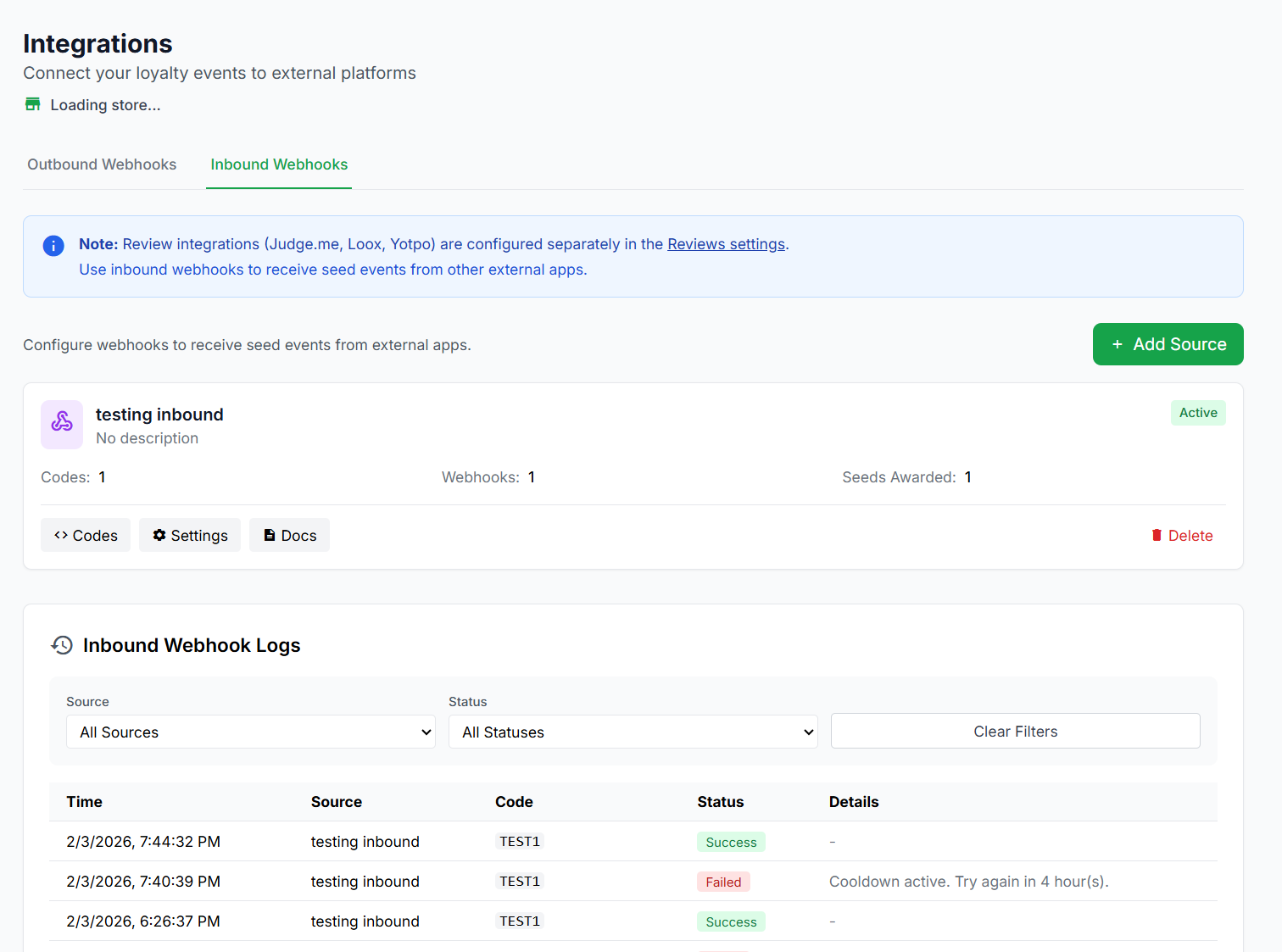
The inbound webhook system uses a Sources & Codes model:
- Create a Source — A source represents an external platform or tool (e.g. "Typeform", "Zapier", "My Quiz App"). Each source gets a unique webhook URL and a secret key for security.
- Add Codes to the Source — Each code defines a specific action that awards seeds (e.g. "quiz_completed", "form_submitted", "birthday_claimed"). You set how many seeds each code awards, with optional limits.
- Send POST requests — Your external platform sends a POST request to the webhook URL with the code and customer info. LoyaltyTree finds or creates the customer and awards the seeds automatically.
External Platform → POST to Webhook URL → LoyaltyTree validates & awards seeds → Customer balance updated
Getting Started
Step 1: Create a Webhook Source
Navigate to Stores → [Your Store] → Integrations → Inbound Webhooks. Click + Add Source and give it a name that describes the external platform (e.g. "Typeform Quizzes" or "Zapier Automation").
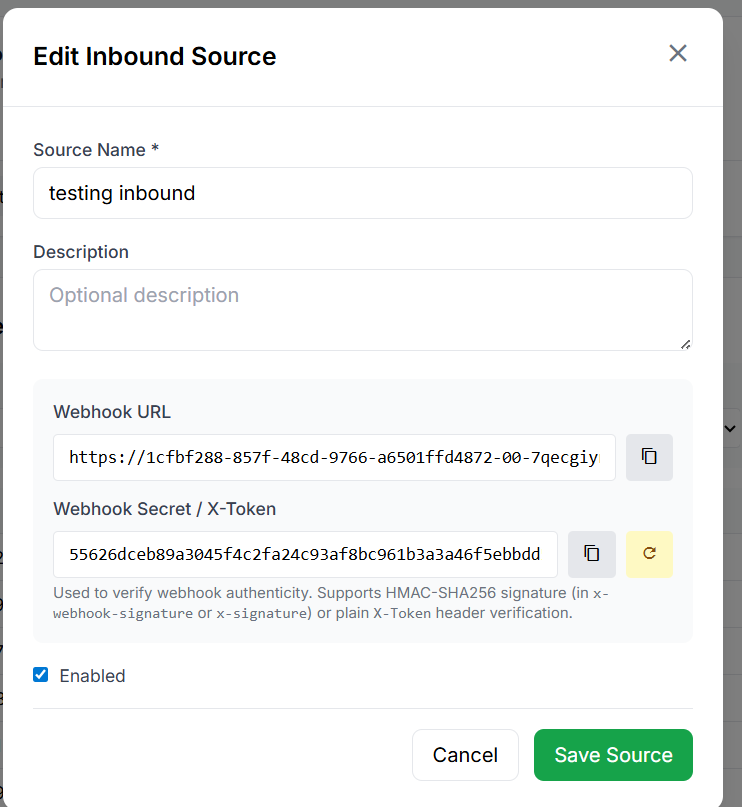
When the source is created, you'll receive:
- Webhook URL — The endpoint your external platform will send requests to
- Webhook Secret — A secret key for signing requests (recommended for security)
Step 2: Add Codes
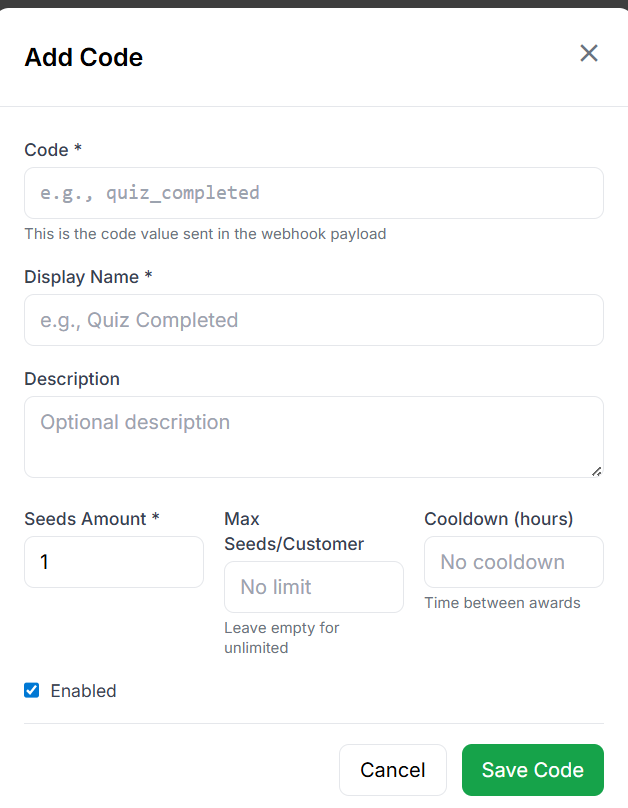
Each code represents a specific action you want to reward. Click + Add Code on your source to create one.
| Field | Required | Description |
|---|---|---|
| Code | Yes | The exact value sent in the webhook payload (e.g. quiz_completed). This must match what your external platform sends. |
| Display Name | Yes | A human-friendly name shown in the admin dashboard and transaction history (e.g. "Quiz Completed"). |
| Description | No | An optional note for your team about when this code is used. |
| Seeds Amount | Yes | How many seeds to award each time this code is triggered. Defaults to 1. |
| Max Seeds/Customer | No | The maximum total seeds a single customer can earn from this code. Leave empty for unlimited. Once a customer reaches this limit, further webhook calls for them will return success but award 0 seeds. |
| Cooldown (hours) | No | Minimum hours between awards for the same customer on this code. Prevents abuse by rate-limiting how often a customer can earn seeds. Leave empty for no cooldown. |
| Enabled | — | Toggle to enable or disable this code without deleting it. Disabled codes return a 403 error. |
Step 3: Configure Your External Platform
Set up your external platform (Zapier, Typeform, custom app, etc.) to send a POST request to your webhook URL whenever the action occurs. See the Request Format section below for the exact payload format.
Codes & Limits Explained
Codes and their limits work together to give you precise control over how seeds are awarded:
Seeds Amount
Each code has a fixed seed amount. Every time the webhook is triggered with that code, the customer receives exactly that many seeds. For example, if you set "quiz_completed" to 5 seeds, every qualifying webhook call awards 5 seeds.
Max Seeds Per Customer
This sets a lifetime cap per customer per code. It's the total seeds that customer can earn from this specific code, not the number of times they can trigger it.
quiz_completed with Seeds Amount = 5 and Max Seeds/Customer = 15.
- 1st quiz completed → +5 seeds (total: 5) ✅
- 2nd quiz completed → +5 seeds (total: 10) ✅
- 3rd quiz completed → +5 seeds (total: 15) ✅
- 4th quiz completed → +0 seeds (limit reached) — returns success but no seeds awarded
Cooldown (Hours)
Sets a minimum wait time between seed awards for the same customer on the same code. The cooldown timer starts from the last successful award.
daily_visit with Seeds Amount = 2 and Cooldown = 24 hours.
- Monday 10am → +2 seeds ✅
- Monday 3pm → +0 seeds (cooldown active, try again in 19 hours)
- Tuesday 11am → +2 seeds ✅
Request Format
Send a POST request to your webhook URL with the following JSON body:
{
  "code": "your_code_here",
  "customer": {
    "email": "customer@example.com",
    "shopify_customer_id": "12345",
    "first_name": "Jane",
    "last_name": "Smith"
  },
  "metadata": {
    "quiz_score": 95,
    "source_page": "spring-quiz"
  }
}| Field | Required | Description |
|---|---|---|
code |
Yes | The code value that matches one of your configured codes (e.g. quiz_completed) |
customer.email |
Yes* | Customer's email address. Used to find or create the customer. Required for new customers. |
customer.shopify_customer_id |
No* | The customer's Shopify ID. Can be used instead of email to identify existing customers. |
customer.first_name |
No | Customer's first name. Used when creating new customers. |
customer.last_name |
No | Customer's last name. Used when creating new customers. |
metadata |
No | Any additional data you want to store with the transaction (e.g. quiz scores, page info). Stored as JSON and visible in logs. |
* At least one of email or shopify_customer_id is required. Email is required when the customer doesn't already exist in LoyaltyTree.
HMAC Signature Verification (Recommended)
To verify that requests are genuinely coming from your platform (and not from someone who found your webhook URL), sign your requests using HMAC-SHA256.
- Take the raw JSON request body as a string
- Create an HMAC-SHA256 hash using your Webhook Secret as the key
- Include the hex-encoded hash in one of the supported headers
Supported signature headers (LoyaltyTree checks all of these):
X-Webhook-SignatureX-Hub-Signature-256X-Signature
The signature value can be either the raw hex hash or prefixed with sha256= (both formats are accepted).
Alternative: Plain Token Authentication
If HMAC signing is not possible in your platform, you can pass your webhook secret as a plain token in the X-Token header. LoyaltyTree will compare it directly to your secret.
Example: Signing with Node.js
const crypto = require('crypto');

const payload = JSON.stringify({
  code: 'quiz_completed',
  customer: { email: 'jane@example.com' }
});
const signature = crypto
  .createHmac('sha256', 'your_webhook_secret')
  .update(payload)
  .digest('hex');
fetch('https://loyaltytree.eco/webhooks/inbound/YOUR_SOURCE_ID', {
  method: 'POST',
  headers: {
    'Content-Type': 'application/json',
    'X-Webhook-Signature': signature
  },
  body: payload
});
Example: Signing with Python
import hmac, hashlib, json, requests

payload = json.dumps({
    "code": "quiz_completed",
    "customer": {"email": "jane@example.com"}
})
signature = hmac.new(
    b'your_webhook_secret',
    payload.encode('utf-8'),
    hashlib.sha256
).hexdigest()
requests.post(
    'https://loyaltytree.eco/webhooks/inbound/YOUR_SOURCE_ID',
    headers={
        'Content-Type': 'application/json',
        'X-Webhook-Signature': signature
    },
    data=payload
)
Example: Using cURL (for testing)
curl -X POST https://loyaltytree.eco/webhooks/inbound/YOUR_SOURCE_ID \
  -H "Content-Type: application/json" \
  -H "X-Token: your_webhook_secret" \
  -d '{"code":"quiz_completed","customer":{"email":"jane@example.com"}}'
Response Format
Successful Response (200)
{
  "success": true,
  "seeds_awarded": 5,
  "transaction_id": "a1b2c3d4-e5f6-7890-abcd-ef1234567890",
  "customer_id": "f0e1d2c3-b4a5-6789-0123-456789abcdef"
}
Successful but Limited (200)
When a cooldown or max seeds limit prevents the award, you still get a 200 response but with 0 seeds and an explanation:
{
  "success": true,
  "seeds_awarded": 0,
  "message": "Cooldown active. Try again in 18 hour(s)."
}

// or
{
  "success": true,
  "seeds_awarded": 0,
  "message": "Maximum seeds (15) already awarded for this code."
}
Error Responses
| HTTP Status | Error | Meaning |
|---|---|---|
| 400 | Missing required field: code |
The code field was not included in the request body |
| 400 | Missing required field: customer.email or customer.shopify_customer_id |
No customer identifier was provided |
| 400 | Unknown code: xyz |
The code sent doesn't match any configured codes for this source |
| 401 | Invalid webhook signature or token |
The HMAC signature or token doesn't match. Check your webhook secret. |
| 403 | Webhook source is disabled |
The source has been disabled in the admin dashboard |
| 403 | Code is disabled: xyz |
The specific code has been disabled |
| 404 | Webhook source not found |
The source ID in the URL doesn't exist. Check the webhook URL. |
Use Case Examples
🧩 Quiz Completion
Reward customers for completing a quiz on your site (built with Typeform, Google Forms, etc.).
- Code:
quiz_completed - Seeds: 10
- Max Seeds: 10 (one-time only)
- Cooldown: none
📋 Survey Response
Award seeds when a customer completes a post-purchase survey.
- Code:
survey_completed - Seeds: 5
- Max Seeds: 25 (up to 5 surveys)
- Cooldown: 168 hours (once per week)
🎂 Birthday Reward
Give seeds on a customer's birthday via your marketing platform.
- Code:
birthday_reward - Seeds: 25
- Max Seeds: none (annual)
- Cooldown: 8760 hours (365 days)
📸 Instagram Tag
Reward customers who tag your brand on Instagram (verified via your social media team or tool).
- Code:
instagram_tag - Seeds: 15
- Max Seeds: 60 (up to 4 tags)
- Cooldown: 72 hours (once every 3 days)
Connecting with Zapier
Zapier is one of the most popular ways to connect LoyaltyTree with hundreds of other apps. We are building a dedicated LoyaltyTree integration in the Zapier App Store, which will make setup even easier — look for it in the Zapier marketplace.
We're adding LoyaltyTree as a native Zapier app. Once available, you'll be able to search for "LoyaltyTree" in the Zapier app directory and connect it directly — no webhook configuration needed. Stay tuned!
In the meantime, you can use Zapier's Webhooks by Zapier action to connect right now:
- Create a Zap with your desired trigger (e.g. "New Typeform Response")
- Add an action step: Webhooks by Zapier → POST
- Set the URL to your LoyaltyTree inbound webhook URL
- Set Payload Type to JSON
- Map the fields:
code→ your code value (e.g. "quiz_completed")customer.email→ the respondent's email from the trigger
- Under Headers, add
X-Tokenwith your webhook secret value - Test and enable your Zap
Connecting with Make (Integromat)
You can also use Make's HTTP / Make a request module to send webhooks to LoyaltyTree. Configure it the same way as Zapier — set the URL, add the JSON body with code and customer, and include your secret in the X-Token header.
Webhook Logs
Every inbound webhook call is logged and visible in the Inbound Webhooks section of your Integrations page. Logs show:
- Timestamp – When the webhook was received
- Source – Which source received it
- Status – Success or failure
- Details – Code used, seeds awarded, or error message
- Payload – The full request body (encrypted at rest)
Use the logs to verify your integration is working correctly and to troubleshoot any issues.
Troubleshooting
Getting 401 "Invalid webhook signature"
- Make sure you're signing the exact JSON body string that you're sending (no extra whitespace or reformatting)
- Verify you're using the correct webhook secret (you can reveal it in the admin dashboard)
- If HMAC signing is not possible, use the
X-Tokenheader with your secret as a plain value - You can regenerate the secret from the source settings if needed
Getting 400 "Unknown code"
- The
codevalue in your request must exactly match a code you've configured in the admin dashboard - Codes are case-sensitive:
Quiz_Completedis different fromquiz_completed - Check that the code is enabled (not disabled)
Seeds awarded is 0
- Check if the customer has hit the Max Seeds/Customer limit for this code
- Check if the Cooldown is still active — the response message will tell you how many hours to wait
- Both return HTTP 200 with
seeds_awarded: 0and an explanation in themessagefield
Customer not being created
- New customers require an email address. If you only send
shopify_customer_id, the customer must already exist in LoyaltyTree. - If both email and Shopify ID are provided, LoyaltyTree first searches by email, then by Shopify ID, and creates a new customer only if neither match.
Security
- Each source gets a unique 64-character webhook secret, auto-generated and encrypted at rest
- Secrets can be regenerated at any time from the source settings (old secret stops working immediately)
- Request payloads are encrypted in the logs for privacy
- Signature verification uses timing-safe comparison to prevent timing attacks
- Sources and codes can be individually disabled without deleting them