
Outbound Integrations
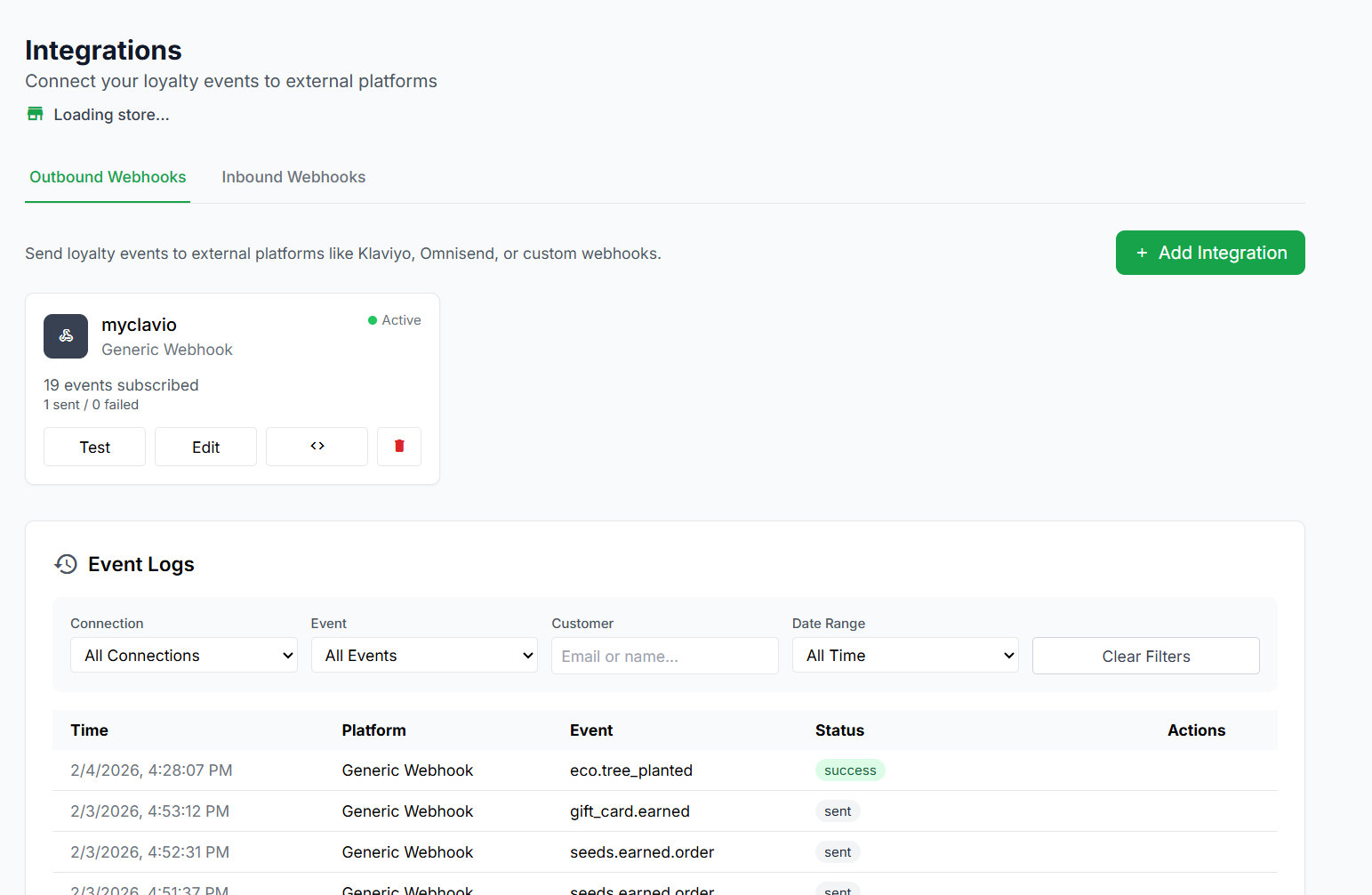
Connect your LoyaltyTree events to external marketing, automation, and analytics platforms. Send real-time data about customer activity to power email campaigns
🔗 Outbound Integrations
Connect your LoyaltyTree events to external marketing, automation, and analytics platforms. Send real-time data about customer activity to power email campaigns, customer segments, automations, and more.
Supported Platforms
LoyaltyTree supports sending events to the following platforms:
| Platform | Type | What You Need |
|---|---|---|
| Klaviyo | Email/SMS Marketing | Your Klaviyo Private API Key |
| Omnisend | Email/SMS Marketing | Your Omnisend API Key |
| Shopify Flow | Shopify Automation | A Flow Trigger Handle (created in Shopify Flow) |
| Generic Webhook | Any HTTP Endpoint | A webhook URL that accepts POST requests |
Getting Started
Step 1: Navigate to Integrations
Go to Stores → [Your Store] → Integrations → Outbound Webhooks in your admin dashboard.
Step 2: Add a New Integration
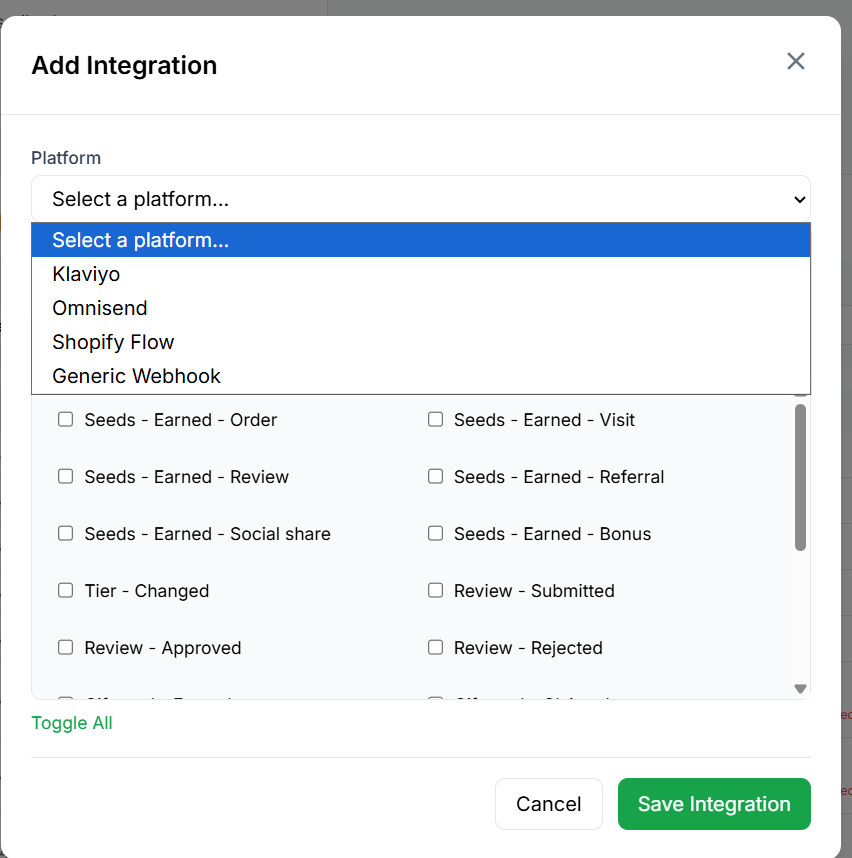
Click the + Add Integration button. Select your platform, give it a name, and choose which events to send.
Step 3: Enter Your Credentials
Depending on the platform, you'll need to provide an API key, webhook URL, or trigger handle. All sensitive data is encrypted before storage.
Step 4: Test the Connection
Use the Test button on your integration card to send a test event and verify everything is connected properly.
Supported Events (19 Total)
You can subscribe each integration to any combination of these events. Only events you select will be sent to that platform.
🌱 Seeds Earned Events
Triggered when a customer earns seeds through various activities.
| Event | Event Key | Triggered When |
|---|---|---|
| Seeds – Earned – Order | seeds.earned.order |
Customer earns seeds from a purchase |
| Seeds – Earned – Visit | seeds.earned.visit |
Customer earns seeds from visiting the store |
| Seeds – Earned – Review | seeds.earned.review |
Customer earns seeds from writing a review |
| Seeds – Earned – Referral | seeds.earned.referral |
Customer earns seeds from a successful referral |
| Seeds – Earned – Social Share | seeds.earned.social_share |
Customer earns seeds from sharing on social media |
| Seeds – Earned – Bonus | seeds.earned.bonus |
Customer receives bonus seeds (birthday, manual award, etc.) |
⭐ Tier & Review Events
| Event | Event Key | Triggered When |
|---|---|---|
| Tier – Changed | tier.changed |
Customer moves to a different loyalty tier |
| Review – Submitted | review.submitted |
Customer submits a new product review |
| Review – Approved | review.approved |
A product review is approved (by AI or manually) |
| Review – Rejected | review.rejected |
A product review is rejected |
🎁 Reward Events
| Event | Event Key | Triggered When |
|---|---|---|
| Gift Card – Earned | gift_card.earned |
Customer qualifies for a gift card reward |
| Gift Card – Claimed | gift_card.claimed |
Customer claims their gift card |
| Store Credit – Earned | store_credit.earned |
Customer qualifies for store credit |
| Store Credit – Claimed | store_credit.claimed |
Customer claims their store credit |
🌳 Eco & Referral Events
| Event | Event Key | Triggered When |
|---|---|---|
| Eco Product – Awarded | eco_product.awarded |
Customer redeems seeds for an eco product |
| Eco – Tree Planted | eco.tree_planted |
A tree is planted for the customer |
| Referral – Generated | referral.generated |
Customer generates a referral link |
| Referral – Visit | referral.visit |
Someone visits the store through a referral link |
| Referral – Successful | referral.successful |
A referred visitor makes a purchase |
Platform Setup Guides
📧 Klaviyo
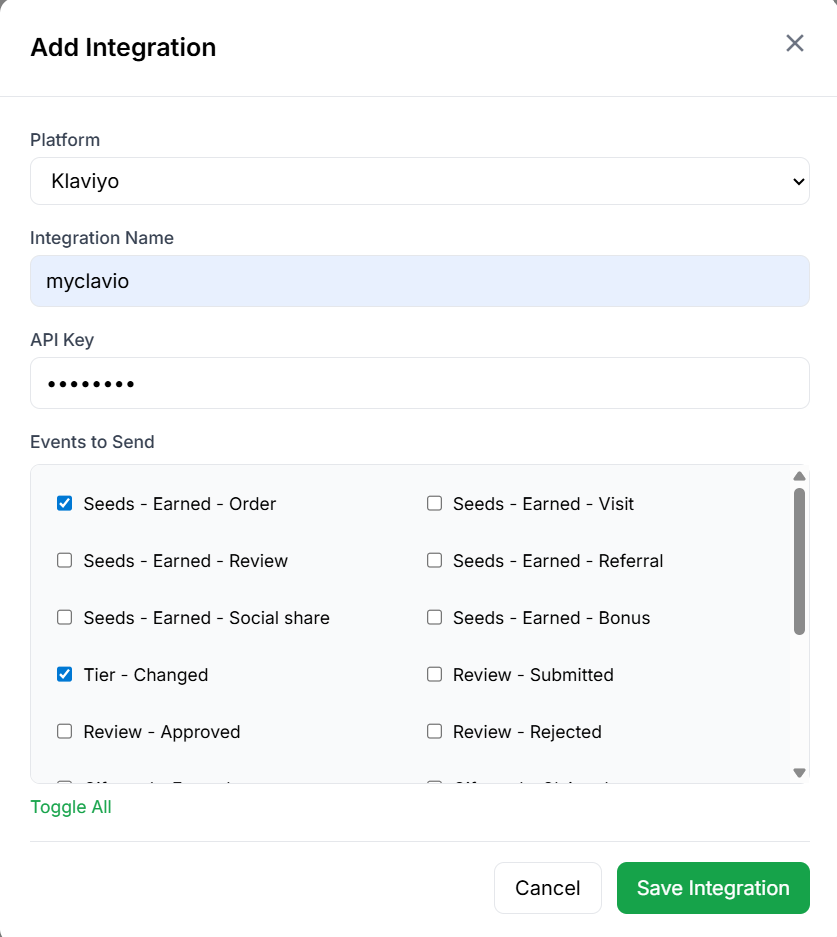
Klaviyo is an email and SMS marketing platform popular with Shopify stores. LoyaltyTree sends events to Klaviyo using their Events API (v3), so you can build segments, flows, and campaigns based on loyalty activity.
- In Klaviyo, go to Settings → API Keys and create a Private API Key
- In LoyaltyTree, click + Add Integration, select Klaviyo
- Paste your Private API Key
- Select which events to send
- Click Save Integration
How it works: LoyaltyTree creates Klaviyo events with the customer's email as the profile identifier. Events appear as custom metrics (e.g. "Seeds Earned Order", "Tier Changed") that you can use in Klaviyo flows and segments. Seed amounts are sent as the event value, so you can use them in conditional splits.
📨 Omnisend
Omnisend is another popular email and SMS marketing platform. LoyaltyTree sends events using the Omnisend Events API (v5).
- In Omnisend, go to Settings → API Keys and generate a key
- In LoyaltyTree, click + Add Integration, select Omnisend
- Paste your API Key
- Select which events to send
- Click Save Integration
How it works: Events are sent with the customer's email, name, and Shopify customer ID. Each event includes all relevant properties (seed amounts, order details, tier info, etc.) so you can use them in Omnisend automation workflows and segmentation.
⚡ Shopify Flow
Shopify Flow is Shopify's built-in automation tool. LoyaltyTree sends events directly to Shopify Flow using the GraphQL flowTriggerReceive mutation, which means events appear as triggers inside your Flow workflows — no third-party apps needed.
- In your Shopify admin, go to Flow and create a new workflow
- Add a trigger — use the trigger handle from the LoyaltyTree app
- In LoyaltyTree, click + Add Integration, select Shopify Flow
- Enter the Flow Trigger Handle that matches your Shopify Flow trigger
- Select which events to send
- Click Save Integration
How it works: When a subscribed event occurs, LoyaltyTree uses your store's Shopify API connection to send the event data directly into Shopify Flow via GraphQL. The payload is flattened into human-readable keys like "Customer email", "Event type", "Amount", etc. You can then use these values as conditions in your Flow to trigger actions like sending emails, tagging customers, or creating tasks.
Example Shopify Flow automations:
- Tag customers when they reach Gold tier
- Send an internal Slack notification when a tree is planted
- Create a task when a review is submitted
- Add a note to the customer profile when they earn a gift card
🌐 Generic Webhook
Send LoyaltyTree events to any HTTP endpoint. This is perfect for connecting to custom systems, Zapier, Make (Integromat), n8n, or any other platform that accepts webhook POSTs.
- Get your webhook endpoint URL from your receiving platform
- In LoyaltyTree, click + Add Integration, select Generic Webhook
- Enter the Webhook URL
- (Optional) Choose an authentication method and add credentials
- (Optional) Add a webhook secret for HMAC signature verification
- Select which events to send
- Click Save Integration
Authentication options:
| Method | Header Sent | Description |
|---|---|---|
| HMAC Signature | X-LoyaltyTree-Signature |
SHA-256 HMAC of the payload body, signed with your webhook secret |
| Bearer Token | Authorization: Bearer <token> |
Standard OAuth-style bearer token authentication |
| X-Token | X-Token: <token> |
Simple token in a custom header |
| Custom Header | <your-header>: <token> |
Specify your own header name and token value |
Custom Payload Templates: For Generic Webhooks, you can customise the payload format for each event using template variables. This lets you match the exact format your receiving system expects.
Standard headers sent with every request:
Content-Type: application/jsonUser-Agent: LoyaltyTree/1.0X-LoyaltyTree-Event: <event_type>X-LoyaltyTree-Timestamp: <ISO timestamp>
Example Webhook Payload
Here's what a typical seeds.earned.order event looks like when delivered to a Generic Webhook:
{
  "event": "seeds.earned.order",
  "timestamp": "2026-02-06T14:30:00.000Z",
  "customer": {
    "email": "jane@example.com",
    "first_name": "Jane",
    "last_name": "Smith",
    "display_name": "Jane Smith",
    "shopify_customer_id": "7891234567890"
  },
  "amount": 50,
  "order_id": "6012345678901",
  "order_number": "1042",
  "order_total": "89.99",
  "order_currency": "USD",
  "balance": 350,
  "tier": "Silver"
}
Every event payload includes the customer object with their email, name, and Shopify customer ID, plus event-specific data fields.
Event Data Reference
Below is a detailed list of the data fields included with each event type.
🌱 seeds.earned.order
- amount – Number of seeds earned
- order_id – Shopify order ID
- order_number – Human-readable order number
- order_total – Order total amount
- order_currency – Currency code (e.g. USD)
- balance – Customer's new seed balance
- tier – Customer's current tier name
👁️ seeds.earned.visit
- amount – Number of seeds earned
- visit_number – Which visit this was
- balance – Customer's new seed balance
- tier – Customer's current tier name
✍️ seeds.earned.review
- amount – Number of seeds earned
- product – Object with product
idandtitle - rating – Star rating (1-5)
- has_photos – Whether the review includes photos
- platform – Review platform (e.g. "loyaltytree")
- balance – Customer's new seed balance
- tier – Customer's current tier name
🤝 seeds.earned.referral
- amount – Number of seeds earned
- referral_type – Type of referral (e.g. "referral_purchase")
- referred_customer – Object with the referred customer's info
- balance – Customer's new seed balance
- tier – Customer's current tier name
📱 seeds.earned.social_share
- amount – Number of seeds earned
- platform – Social platform used (e.g. "twitter", "facebook")
- share_url – The URL that was shared
- balance – Customer's new seed balance
- tier – Customer's current tier name
🎉 seeds.earned.bonus
- amount – Number of seeds earned
- reason – Reason for the bonus (e.g. "Birthday bonus")
- balance – Customer's new seed balance
- tier – Customer's current tier name
📊 tier.changed
- old_tier – Previous tier name
- new_tier – New tier name
- total_seeds – Customer's total lifetime seeds
📝 review.submitted
- review_id – Unique review identifier
- product – Object with product
idandtitle - rating – Star rating (1-5)
- title – Review title
- body – Review body text
- photos – Array of photo URLs
- has_photo – Whether the review has photos
✅ review.approved
- review_id – Unique review identifier
- product – Object with product
idandtitle - rating – Star rating (1-5)
- title – Review title
- body – Review body text
- photos – Array of photo URLs
- seeds_awarded – Seeds given for this review
❌ review.rejected
- review_id – Unique review identifier
- product – Object with product
idandtitle - rating – Star rating (1-5)
- rejection_reason – Why the review was rejected
🎁 gift_card.earned
- amount – Gift card monetary value
- currency – Currency code
- seeds_redeemed – Seeds spent to earn this
- tier – Customer's current tier
💳 gift_card.claimed
- amount – Gift card monetary value
- currency – Currency code
- code – The gift card code
💰 store_credit.earned & store_credit.claimed
- amount – Store credit monetary value
- currency – Currency code
- seeds_redeemed – Seeds spent (earned event only)
- tier – Customer's current tier (earned event only)
🌳 eco_product.awarded
- eco_product_name – Name of the eco product
- eco_product_type – Type (e.g. "tree", "coral")
- seeds_spent – Seeds spent on this product
🌲 eco.tree_planted
- trees_count – Number of trees planted
- project_name – Reforestation project name
- certificate_url – Link to the planting certificate
🔗 referral.generated, referral.visit & referral.successful
- referral_code – Unique referral code (generated only)
- share_url – Referral URL (generated only)
- visitor_id – Anonymous visitor ID (visit only)
- seeds_awarded – Seeds earned (visit & successful)
- referred_customer – Info about the new customer (successful only)
- order_total – Referred customer's order total (successful only)
Reliability & Retry Logic
LoyaltyTree uses an async queue to ensure reliable event delivery. Events are never lost — if delivery fails, the system automatically retries with exponential backoff.
| Retry Attempt | Wait Time |
|---|---|
| 1st retry | 1 minute |
| 2nd retry | 5 minutes |
| 3rd retry | 30 minutes |
| 4th retry | 2 hours |
| 5th retry (final) | 24 hours |
After all retries are exhausted, the event is marked as "exhausted" and appears in your Event Logs with a Retry button so you can manually retry it at any time.
Event Logs
Every event delivery is logged and visible in the Event Logs section on the Integrations page. You can filter logs by:
- Connection – See events for a specific integration
- Event – Filter by event type
- Customer – Search by customer email or name
- Date Range – View events from a specific time period
Each log entry shows the time, platform, event type, status, and any error messages. Failed events include a Retry button to re-queue them immediately.
Troubleshooting
Events show "failed" status
Check the error message in the Event Logs. Common causes:
- Could not connect – The webhook URL may be down or incorrect
- 401/403 error – Your API key or authentication token may be invalid
- Timeout – The receiving server is too slow to respond (10-second timeout)
Events not appearing in Klaviyo/Omnisend
Make sure the customer has a valid email address. Both Klaviyo and Omnisend require an email to associate the event. Anonymous customers without emails will not generate events for these platforms.
Shopify Flow trigger not firing
Verify that:
- The Shopify Flow app is installed in your store
- Your Flow workflow is active (not paused)
- The trigger handle in LoyaltyTree matches exactly what you set up in Shopify Flow
- Your Shopify plan supports Flow (Basic or above)
Security
- All API keys and tokens are encrypted at rest using AES-256-CBC encryption
- Webhook secrets enable HMAC signature verification so your endpoint can verify requests genuinely came from LoyaltyTree
- Events are processed through an async queue — your store's performance is never impacted by integration delivery
- Old delivered events and logs are automatically cleaned up after 30 days