
Connecting External Review Platforms
We support seamless integration of all major review platforms into our loyalty system.
External Review Platform Integration
Connect your existing third-party review platform to LoyaltyTree to sync reviews and award seeds to customers automatically.
Overview
If you already use a review platform like Judge.me, Loox, or Yotpo, you can integrate it with LoyaltyTree instead of switching to our native review system. This allows you to:
- Keep your existing reviews: No need to migrate or start over
- Award seeds for reviews: Customers earn loyalty rewards when they leave reviews
- Unified customer experience: Reviews contribute to their overall loyalty journey
- Automatic sync: Reviews flow into LoyaltyTree via webhooks
Step 1: Access Review Settings
- Navigate to Stores in your LoyaltyTree admin
- Find your store card and click the Review Settings button
- Go to the Settings tab
Step 2: Select External Platform Mode
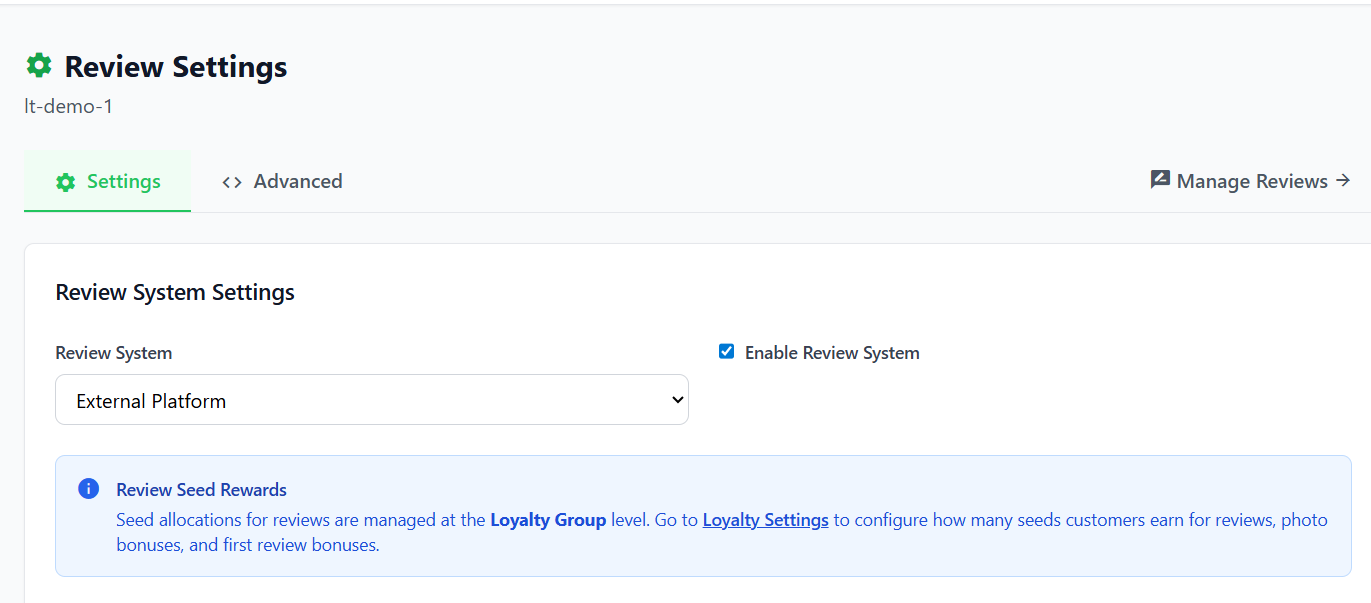
In the Review System Settings:
- Find the Review System dropdown
- Change it from "LoyaltyTree Native" to External Platform
- Make sure Enable Review System is checked
Step 3: Choose Your Review Platform
Select your review provider from the Review Platform dropdown:
| Platform | Description |
|---|---|
| Judge.me | Popular Shopify review app with photo/video reviews |
| Loox | Photo-focused review platform |
| Yotpo | Enterprise-grade reviews and UGC platform |
| Generic / Custom | Any other platform that supports webhooks |
Step 4: Enable Webhook Processing
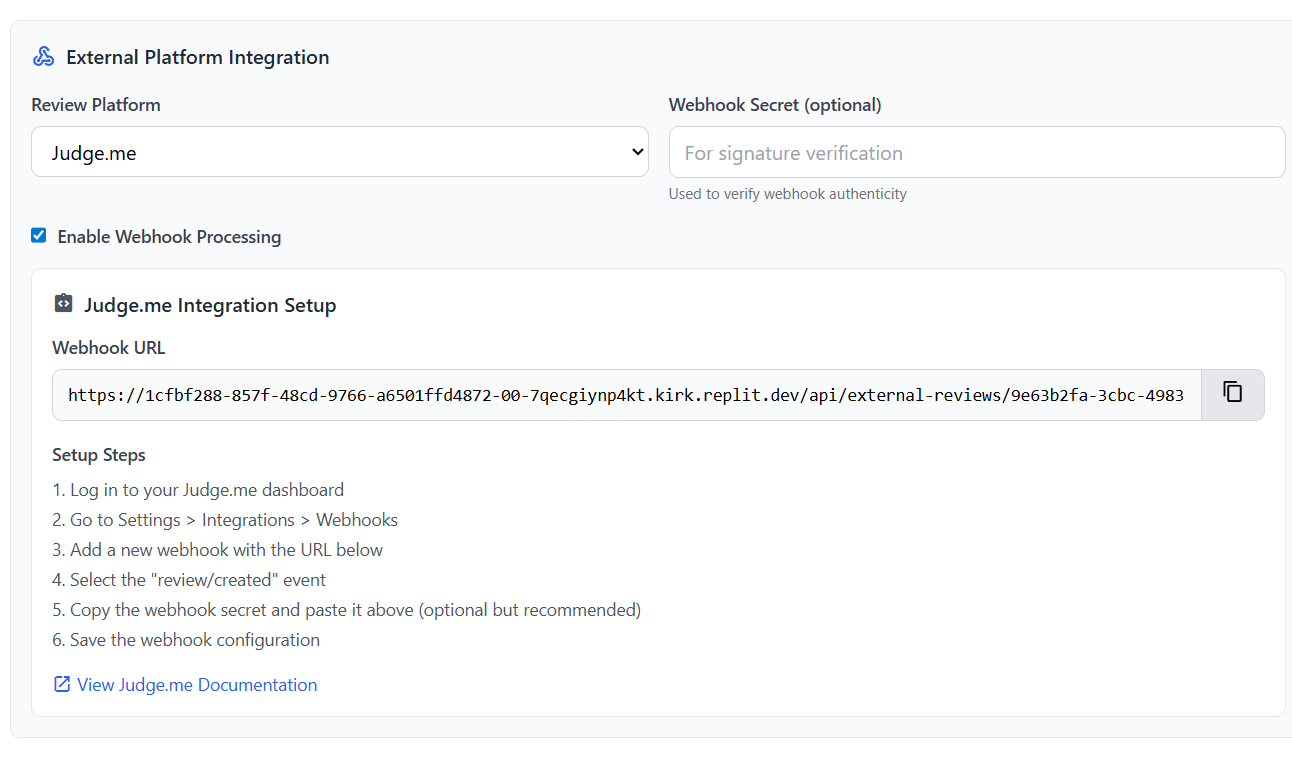
Check the Enable Webhook Processing option. This allows LoyaltyTree to receive and process review data from your external platform.
Step 5: Configure Webhook URL
Once you select a platform, LoyaltyTree generates a unique Webhook URL for your store.
Copy Your Webhook URL:
- Find the Webhook URL field in the integration panel
- Click the Copy button to copy the full URL
- Keep this URL secure - it's unique to your store
Add the Webhook to Your Review Platform:
The exact steps vary by platform, but generally:
- Go to your review platform's admin settings
- Find the Webhooks or Integrations section
- Add a new webhook with the URL you copied
- Select the Review Created or New Review event
- Save your webhook configuration
Step 6: Webhook Secret (Optional)
For added security, you can configure a Webhook Secret to verify that incoming webhooks are authentic.
How it works:
- Enter a secret key in the Webhook Secret field
- Configure your review platform to sign requests with this secret
- LoyaltyTree will verify the signature using the
x-webhook-signatureorx-signatureheader
Note: Not all platforms support webhook signatures. If yours doesn't, you can leave this field empty.
Step 7: Generic/Custom Option - Expected JSON Format
When your review platform sends a webhook, LoyaltyTree expects the following data format:
{
  "customer_email": "customer@example.com",
  "rating": 5,
  "body": "Great product!",
  "has_photos": true,
  "product_id": "12345",
  "product_title": "Product Name"
}
Required Fields:
| Field | Description |
|---|---|
customer_email |
Required. The email address of the customer who wrote the review |
rating |
Star rating (1-5) |
body |
The review text content |
has_photos |
Boolean indicating if the review includes photos |
product_id |
Your Shopify product ID |
product_title |
The product name |
Nested Format Support:
LoyaltyTree also supports nested data formats commonly used by review platforms:
{
  "data": {
    "email": "customer@example.com",
    "rating": 5,
    "body": "Great product!"
  }
}
Seed Rewards for External Reviews
Note: Seed allocations for reviews are managed at the Loyalty Group level. Go to your store's Loyalty Settings → Seed Settings to configure how many seeds customers earn for reviews, photo bonuses, and first review bonuses.
When a review webhook is received:
- LoyaltyTree matches the
customer_emailto an existing customer - If found, seeds are awarded based on your Seed Settings configuration
- Photo reviews can earn bonus seeds if configured
- First-time reviewers can earn additional bonus seeds
Troubleshooting
Reviews not syncing?
- Check the webhook URL: Make sure you copied the complete URL including all query parameters
- Verify webhook is enabled: Confirm "Enable Webhook Processing" is checked in LoyaltyTree
- Check your review platform: Ensure the webhook is active and pointing to the correct URL
- Test with a new review: Submit a test review to trigger the webhook
Customer not receiving seeds?
- Email must match: The
customer_emailin the webhook must match a customer in your LoyaltyTree database - Check Seed Settings: Verify that review rewards are configured in your Loyalty Group
- Customer must be registered: Anonymous or guest customers may not receive seed awards
Webhook signature errors?
- Secret must match: The secret in LoyaltyTree must exactly match the one configured in your review platform
- Header format: LoyaltyTree looks for
x-webhook-signatureorx-signatureheaders
Need Help?
Contact our support team at support@loyaltytree.eco for assistance with external review platform integration.