
Configuring Automated Gift Cards/Store Credits
Set up automated Shopify gift card or store credit rewards for loyal customers. Configure triggers, amounts, expiration policies, and approval workflows.
Configuring Automated Gift Cards or Store Credits
Set up automated Shopify gift card/Credit rewards to incentivize customer loyalty and repeat purchases.
System Overview
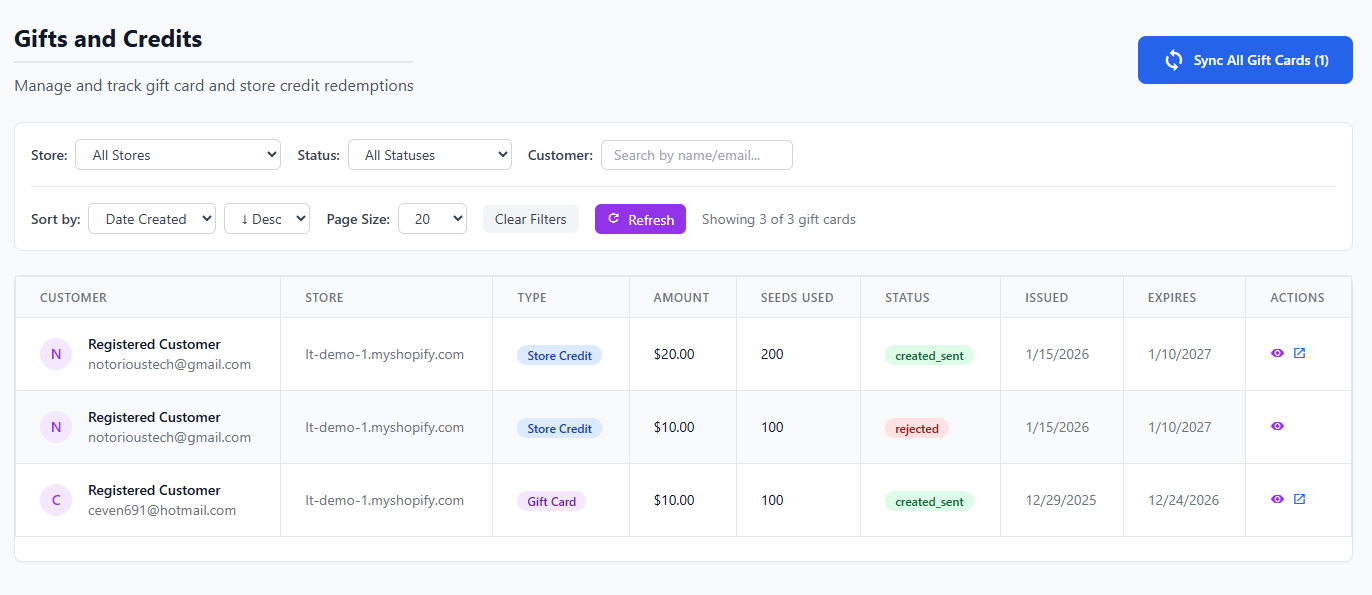
Manage all gift card rewards and configurations
LoyaltyTree can automatically issue Shopify gift cards when customers reach specific loyalty milestones. This powerful feature drives engagement and rewards your best customers.
Setting Up Gift Cards
Step 1: Navigate to Gift Card Settings
Go to Store → Gift Cards/Credits in LoyaltyTree admin.
Step 2: Choose your Reward Type: Cards or Credits
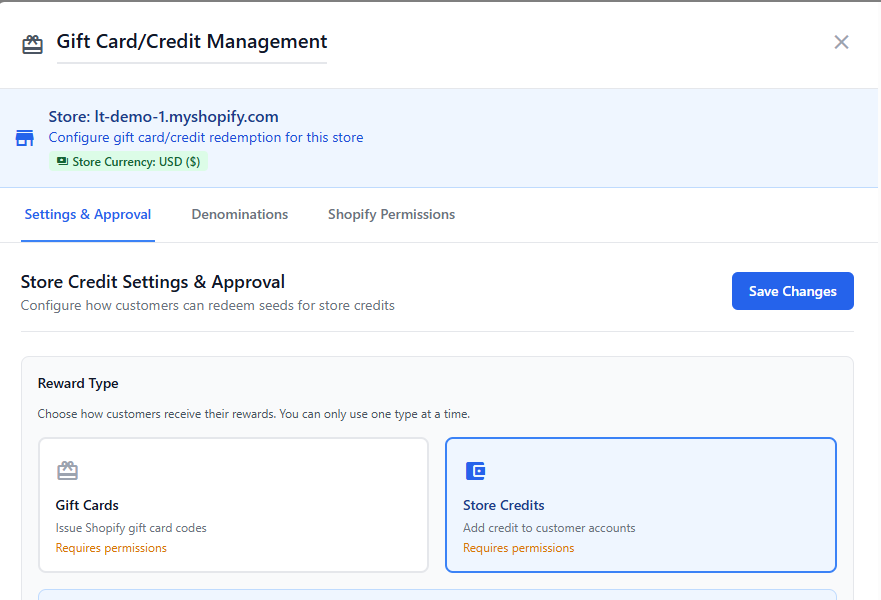
Decide on reward type
Step 3: Grant the shopify permissions

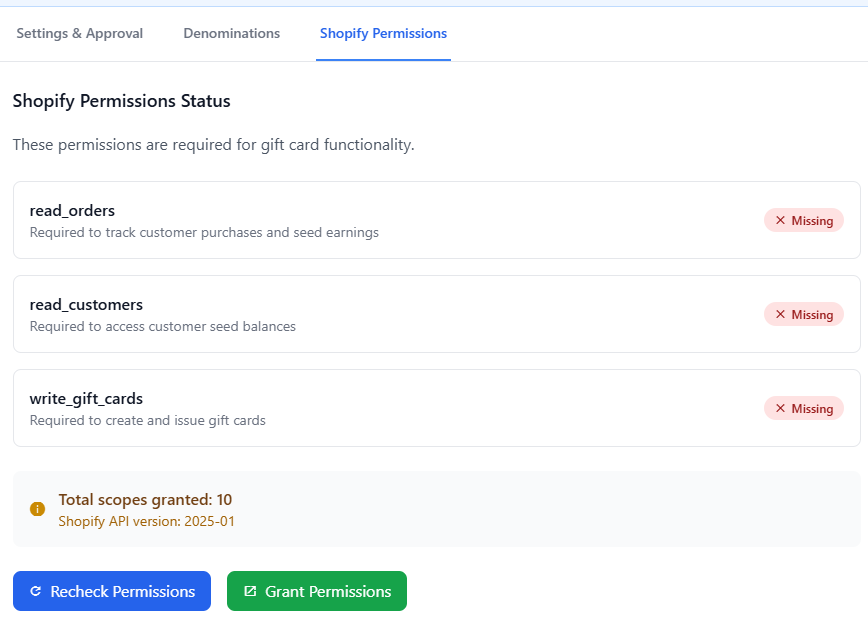
Click Shopify Permissions Tab and then Grant Permissions. A new tab will open to approve the permissions and then click Recheck. Now you can got back to Settings&Approval Tab to complete next step
Step 5: Configure Approvals and Claim Options
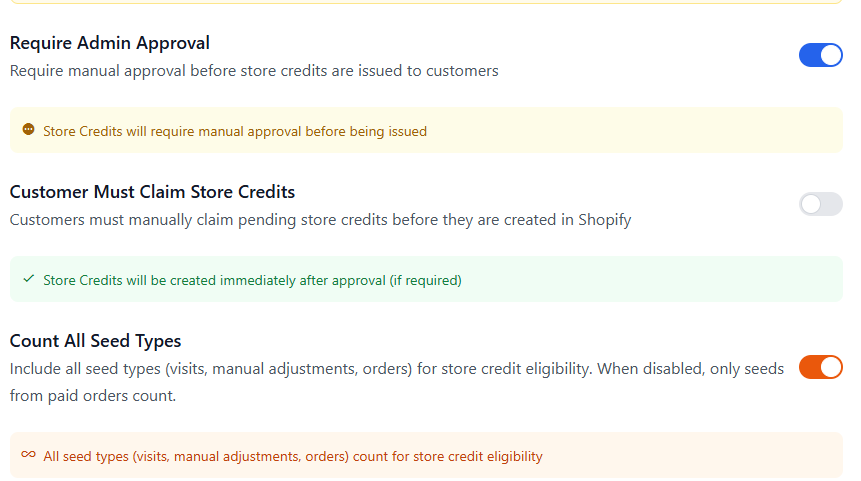
Manual vs. Automatic Approval
Choose whether gift cards require admin approval:
- Automatic: Issued instantly when customer qualifies (recommended)
- Manual Approval: Admin reviews each reward before issuance
Manual approval helps prevent abuse for high-value rewards.
Step 6: Configure Limits
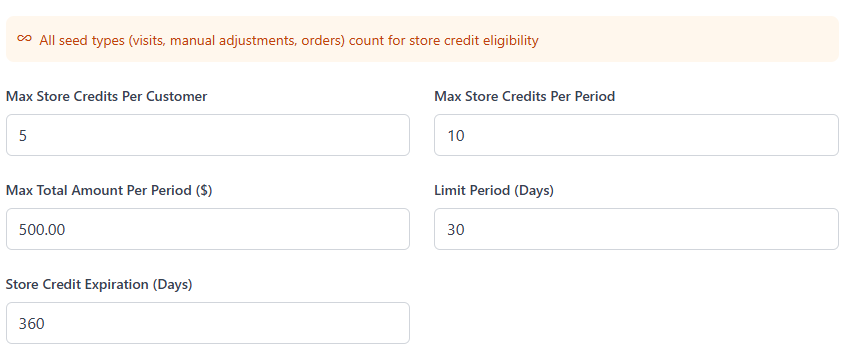
Step 5: Configure Denominations
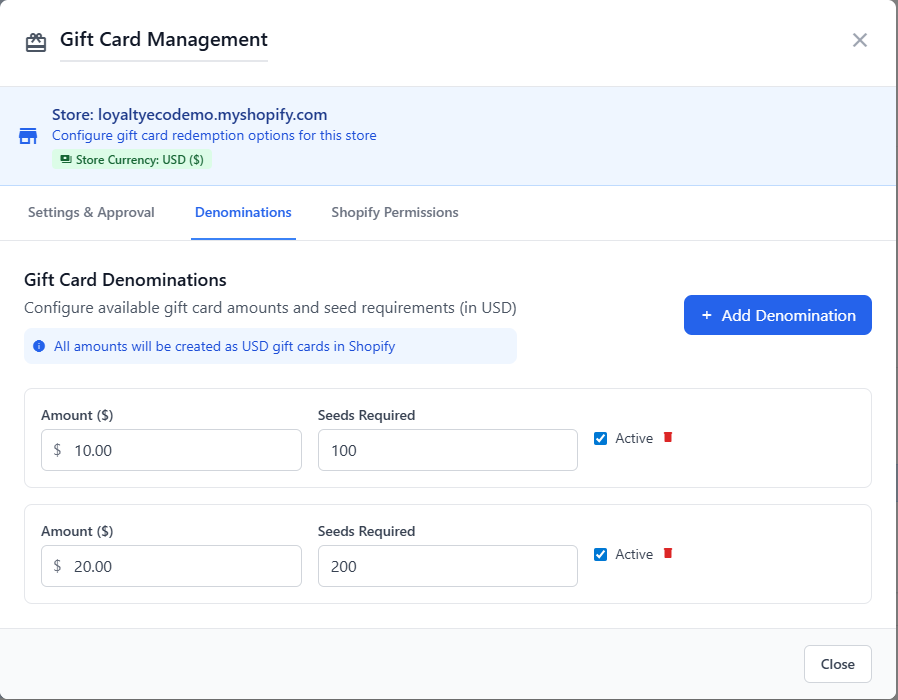
Set up different gift card values for tier reward
Customer Notification
Notification Channels
Customers are notified of gift card rewards via:
- In-widget notification popup
- Email with gift card code
- Customer dashboard display
Redemption Process
How Customers Redeem
Customers can claim their gift cards:
- View available gift cards in loyalty widget or dashboard
- Click "Claim Gift Card"
- Gift card code is generated via Shopify API
- Code displayed and emailed to customer
- Customer applies code at checkout
Tracking and Analytics
Gift Card Metrics
Monitor gift card performance:
- Total gift cards issued
- Redemption rate
- Average time to redemption
- Revenue impact from gift card recipients
Access reports at Customers → Gift Cards → Analytics.
Anti-Abuse Measures
Preventing Exploitation
Built-in safeguards include:
- Per-customer limits
- Seed earning rate limits
- Manual approval for high-value rewards
- Fraud detection algorithms
- Admin ability to revoke gift cards
Best Practices
- Start conservative: Begin with lower values and monitor redemption
- Tier your rewards: Multiple gift card levels encourage continued engagement
- Set reasonable limits: Typically 1-3 times per customer per tier
- Use expiration strategically: 90 days balances urgency with fairness
- Promote the program: Highlight gift card rewards in marketing
- Track ROI: Ensure gift cards drive incremental revenue
Example Configurations
Conservative Approach
- 1000 seeds → $10 gift card (limit: 1 per customer)
- 5000 seeds → $50 gift card (limit: 1 per customer)
- 90-day expiration
- Manual approval enabled
Aggressive Growth Strategy
- 500 seeds → $5 gift card (limit: 3 per customer)
- 2000 seeds → $25 gift card (limit: 2 per customer)
- 10000 seeds → $100 gift card (limit: 1 per customer)
- Never expires
- Automatic approval
Ensure your Shopify app has gift card creation permissions
LoyaltyTree uses Shopify's native gift card system, ensuring:
- Full POS compatibility
- Balance tracking in Shopify admin
- Standard Shopify checkout redemption
- Compatibility with other Shopify features
Troubleshooting
- Gift cards not generated: Verify Shopify API permissions include gift card creation
- Customers not receiving notifications: Check email settings and spam folders
- Incorrect threshold triggers: Verify seed calculation settings
- Redemption failures: Ensure gift card products are enabled in Shopify
Next Steps
Review tracking and reporting features to monitor your loyalty program performance.